Rubrika: IT

  • Ach ty personálky

    Zase jedna personálka perlila, zřejmě si nepřečetli můj starší zápisek. Agentura, jejíž jméno je stejné jako nepřepisovatelné optické médium, mi poslala nabídku pozic, o kterých usoudili, že by mě mohly zajímat:

    • konstruktér výpočtář
    • konstruktér forem pro vstřikování
    • optik – optoelektronik

    Fakt nevím, co si od takových emailů slibují. Buď je myslí vážně a autor emailu je  neschopný hlupák, nebo takto formulovali hromadný mail, který poslali všem v databázi. Opět neprofesionalita. Raději jsem se nechal smazat z jejich databáze, abych se jednou nedočkal personalizované nabídky na místo manažera záchodků na hlavním nádraží 🙂

  • SoapUI and SSLPeerUnverifiedException

    I have developed and tested new web service. I used SoapUI for testing local endpoint. Next step was to deploy the service into testing environment. But suddenly I failed to connect to this endpoint. I was able to open its WSDL description in Firefox, but SoapUI failed with SSLPeerUnverifiedException: peer not authenticated. The setup was network with proxy and there was Apache proxy translating URLs for the service. There was many similar complaints on web but no solution. I tried many proposals like trusting the certificate (because StartCom is not trusted certification authority in Java) but nothing helped. Until I posted a question SoapUI fails to connect HTTPS (SSLPeerUnverifiedException) on StackOverflow. It lead me to solution:

    1. edit bin/soapui.bat
    2. find setting the property JAVA_OPTS
    3. append -Djsse.enableSNIExtension=false

    The reason for this behavior is explained in this answer:

    Java 7 introduced SNI support which is enabled by default. I have found out that certain misconfigured servers send an „Unrecognized Name“ warning in the SSL handshake which is ignored by most clients… except for Java.

    Blog bitcoin address: 1GQBYqZwiHT72UrLCCSv4j6WkK65FjTPJk

  • OAuthLogin – beta testing

    No public interest, so I discontinued this project

    I have an idea of writing new website and I know that people do not like registrations. To maximize user involvement and participation I decided to support OAuth login technology which delegates authentication and authorization to different provider. In other words you can safely login with Google, Facebook and many other service accounts. I found Scribe library that helps Java developers but I realized that it is not such easy to start. So I decided to write a prototype first to learn all neccessary technologies in advance. And once it progressed and I put more effort in it I decided to make it public and open source.

    So there it is. It is beta release which improved user experience and fixed too broad privileges issue. It is standalone Java Enterprise application consisting of two modules: EJB and WAR. The users are persisted in database via JPA. The users can log with Google, Twitter and Facebook. I reconsider Microsoft account support as well. It is possible to log with one provider and then link other providers as well, so you can later choose any provider to log into same account.

    GitHub


  • Security by McAfee

    There is McAfee Endpoint Security running on my work computer. Yesterday I lost few hours with having it blocked by my computer. I turned the computer on in the morning but Endpoint Security (ES) did not accept my password with following message: Error EE0F0001: Token authentication parameters are incorrect. I was more carefull typing the password, I had to wait for a minute  but it failed again. The third attempt failed again (and pause doubled). Then I had to call to a service desk to unlock it via passphrase exchange. I was curios, if the error disappeared so I rebooted my computer,  typed carefully the password and the same problem occured again, but the wait time increased to 5 minutes.

    So I called helpdesk again, we went through the same procedure and he told me to change my windows password. I did and I printed neccessary materials, then I rebooted the computer and tried again – 15 minutes wait time and passwors was not still accepted. Fourth unlock procedure and guy from helpdesk told me that I need to wait at least half an hour after password change before rebooting computer to let McAfee Endpoint security sync new password. Fine, I did it again, finished some important work, verified in ES that authentical token was synced recently and rebooted notebook again. I typed my password and it told me that it is blocked for 30 minutes now! I called the helpdesk again and he told me that I had to switch off the computer to reset this pause counter. When I did, I could login in immediatelly.

    Well, friday was not very productive day. But i realized that to spoof McAfee’s security increasing pause you just need to turn the computer off.

  • Linking external directories to Google drive

    I recently started to use Google Drive desktop client on Windows. It created Disk Google in my home directory. Test was OK, but I realized one thing: there is no possibility to add a directory outside of this default directory. I was used to SugarSync where I had total control, which directory will be synchronized and I lacked this feature in Google Drive. Having strong Unix background I immediatelly had an idea to use symlinks. I knew there was such functionality in NFTS and after while I found junction command.

    The first attempt was unsuccessful. When I created symlink in my Google Drive directory pointing to the requested location, nothing happened. Google Drive completely ignored such directory. When I reversed the direction, it worked. So I had to move existing directory (AppData\Roaming\.purple\logs\ to synchronize IM conversations across multiple computers) to Google Drive and then create symlink on original location. That’s it.

    c:\Users\Leoš\AppData\Roaming\.purple>c:\bin\junction.exe logs "c:\Users\Leoš\Disk Google\pidgin\"
    
    Junction v1.06 - Windows junction creator and reparse point viewer
    Copyright (C) 2000-2010 Mark Russinovich
    Sysinternals - www.sysinternals.com
    
    Created: c:\Users\Leo?\AppData\Roaming\.purple\logs
    Targetted at: c:\Users\Leo?\Disk Google\pidgin"
  • Duplicate entry in a form

    I have seen several forms recently that requested user to enter some information twice. It makes sense to retype the password that user has chosen. It reduces a risk that user does typo and newly created account will be unaccessible. But these forms asked the user to retype his email address or existing password. The email address is displayed unlike password, so the risk of typo is quite small. But I can imagine that developer thinks that this email is so important to force the user to enter the same information twice. To retype existing password is totally useless. If the user enters his password incorrectly, just redisplay the form. Please when you design some form with duplicated entry of some field, ask yourself – is it really neccessary to bother the user?

  • Tips on installing MS SQL 2012 Express edition

    Well, I was once again forced to use another Microsoft product – their database this time. And it took me several hours to make it work, so I want to share some details in hope, that it will be helpfull to you.

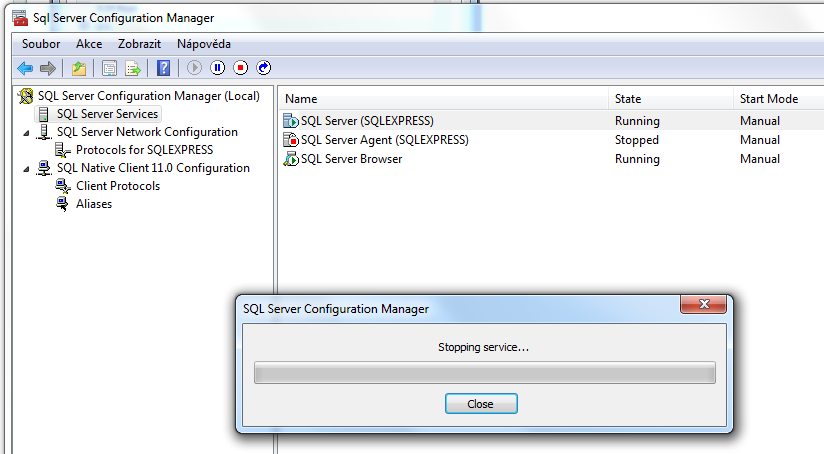
    The installation was smooth but later I realized that I cannot contact this database from java. Why? TCP IP was disabled by default. This is very secure option, yet I can imagine more secure one – switch the computer off. Stop kidding. Open SQL Server Configuration Manager, open Network configuration from left tree and select Protocols node. There you need to enable TCP/IP protocol, open its properties dialog and change the property Enabled to true.
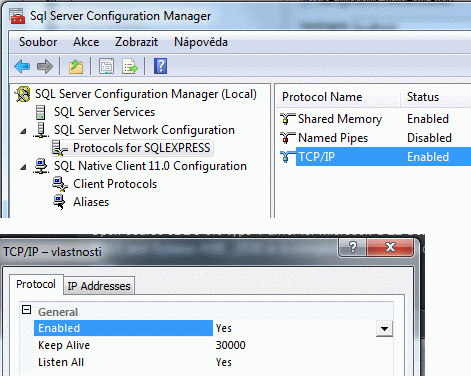
    TCP/IP protocol properties

    Dis is one half. Oh no, it is back! (Who does understand this joke?)

    If you try to connect this new database, you will fail again. MS SQL will play a game Guess my port with you. Ok, they have some naming service and some good reasons for this behaviour, but let keep things simple and switch off dynamic ports feature. Choose IP addresses tab. Either modify one concrete network interface or find the last section IP All. Delete value in the option TCP Dynamic Ports and set 1433 to the option TCP Port. Finally you have to restart MS SQL service.
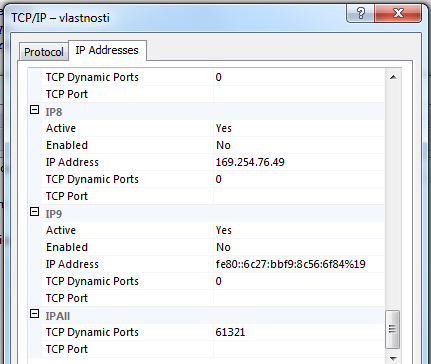
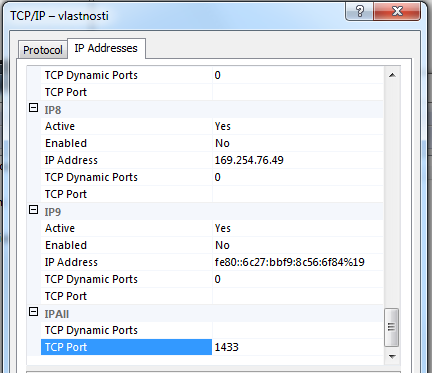
    Default value with dynamic portupdated value to MS SQL default portRestarting MS SQL service

    Stop, we are not finished yet. You do not want to use your windows credentials and probably store them somewhere in configuration files, do you? So it is time to switch off Windows Authentication mode. Open MS SQL Management Studio, edit server properties, Security page particularly. There you need to select mixed mode – both SQL Server and Windows Authentication modes in Server authentication section.
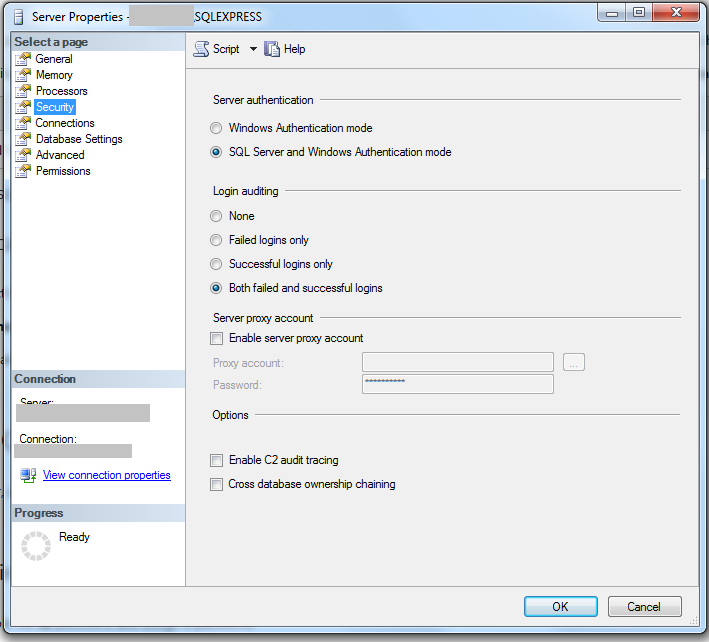
    Selecting authentication mode

    And finally create some user with appropriate roles. It is neccessary to be DDL admin and DB owner for development purposes. Restart MS SQL
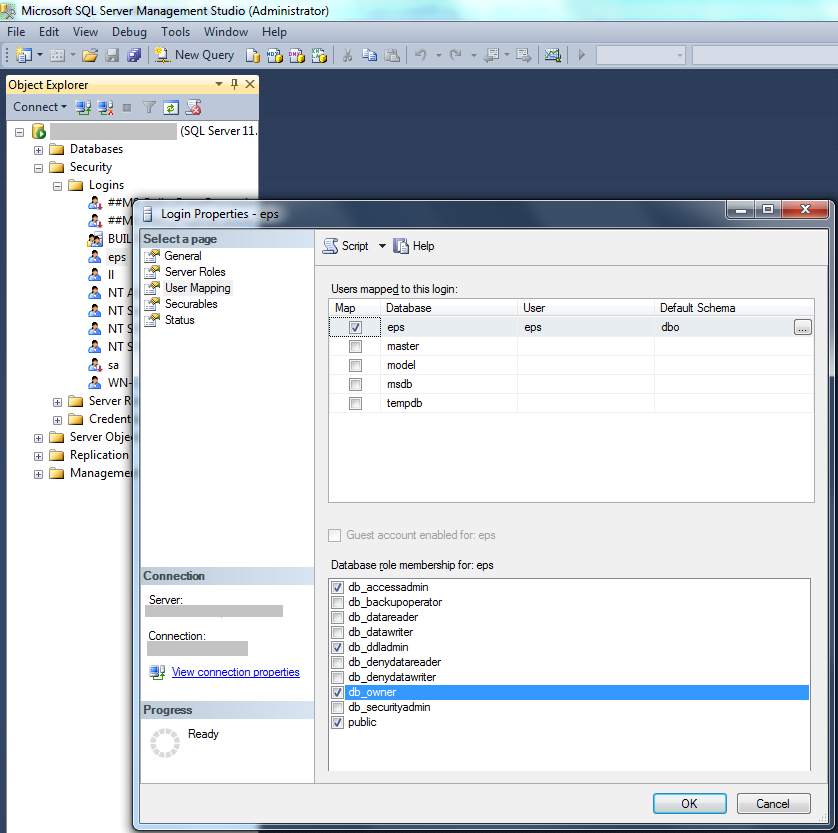
    Adding new user

    Some useful links I used:

    Blog bitcoin address: 1GQBYqZwiHT72UrLCCSv4j6WkK65FjTPJk